
Affiliate marketing is rapidly evolving in 2026 as global e-commerce grows and networks become more advanced. Brands face new challenges. To stay competitive, affiliate infrastructures need to adapt and stay ahead.
GoAffPro has launched new 2026 features to enhance your program control. With regional sign-up restrictions, affiliate earnings reports, and the option to develop API integrations, these updates to your GoAffPro dashboard will boost your program’s efficiency.

Set up Geoblocking: Total Control Over Your Affiliate Footprint
As your brand gains traction, your affiliate signup page will naturally attract traffic from all over the world. While global scale is great, it isn’t always viable for every merchant. You might have shipping restrictions or may be experiencing a high volume of low-quality spam affiliate signups.
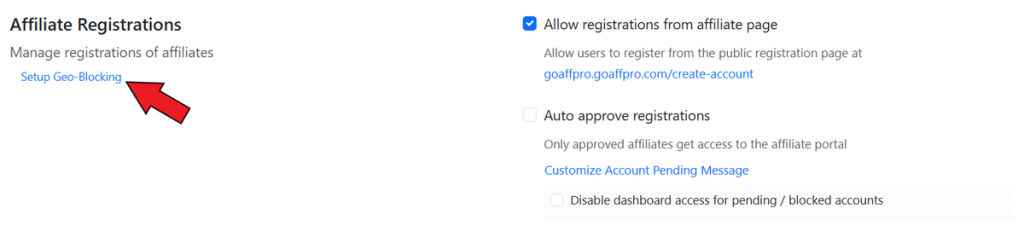
GoAffPro’s Geoblocking feature gives you complete geographical control over who can join your program. To set this up:
- In your GoAffPro admin panel, go to Settings > General > Affiliate Registrations section.
- Configure the Setup Geo-Blocking option from there. You can choose to whitelist or blacklist countries.
Whitelist Strategy: If you only ship to the United States and Canada, you can whitelist these two countries. Anyone trying to register from outside North America will be automatically blocked.
Blacklist Strategy: Alternatively, if you operate globally but have identified specific regions from where you get spam registrations, you can blacklist those specific countries.
Earnings Report: Automating Affiliate Tax and Income Records
During tax season, affiliate managers are bombarded with emails from affiliates asking for detailed breakdowns of their earnings. For higher-tiered affiliates, invoices or payment receipts may not be enough. They often require extensive reports.
The Earnings Report feature automates this process. It automatically generates and lets affiliates download their own comprehensive payout reports directly from their dashboard.
- In your GoAffPro admin panel, go to Settings > Extras section.
- Here, go to the Earnings Report section and toggle it on.

Empowering the Affiliate: Instead of reaching out to the merchant, the affiliate logs into their dashboard, selects the payout, and downloads a clean, formatted PDF or CSV of their earnings.
Custom Templates: GoAffPro allows merchants to customize the report template. You can ensure your brand logo, business address, and important information are present on the document.
Default Sponsor: Bulletproofing Your Multi-Level Network
Multi-level affiliate networks are useful for rapid, viral growth. However, a common hurdle merchants face is that if a new user signs up for your program organically (without clicking a specific parent affiliate’s referral link), they sit at the top of the network without a sponsor.
The Default Sponsor feature solves this. It allows merchants to designate a specific, master affiliate account as the fallback sponsor for any newly registered, unreferred affiliate. To set this:
- In your GoAffPro admin panel, go to the Multi Level tab.
- Go to the Default Sponsor section and select the affiliate.

Network Continuity: This ensures that every single person who joins your program is placed into a defined downline.
Strategic Growth: Merchants often have a dedicated internal “House Account” as the default sponsor. This allows the merchant to collect the overarching network overrides and accurately track the performance of organic vs. referred signups within the MLM structure.
Developer Features: Custom Development & Integrations
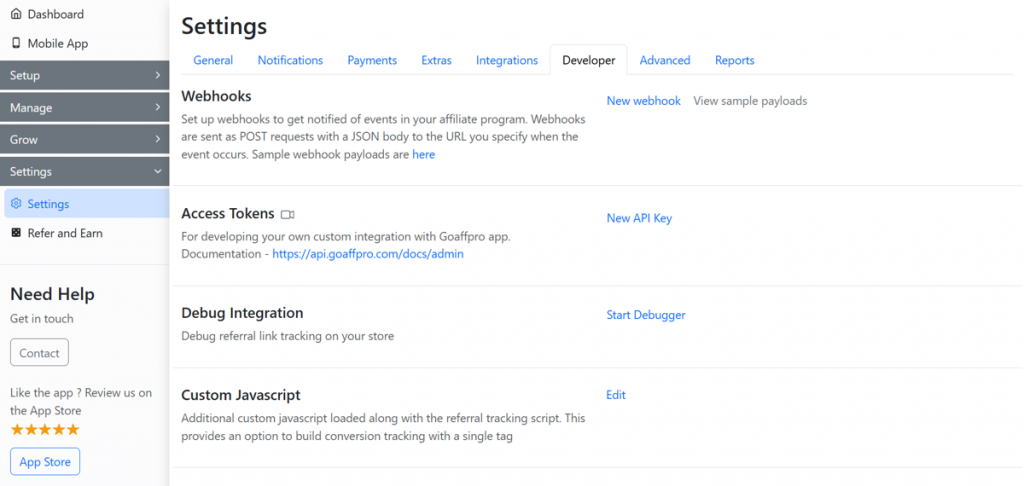
GoAffPro has expanded its Developer Section, allowing merchants to integrate seamlessly with any custom tech stack. You can check these from the Settings > Developer section. These features include:
- Webhooks: Webhooks allow you to set up real-time, automated notifications for critical events. When a new affiliate registers or a commission is generated, GoAffPro instantly pushes that payload to your external CRM.
- Access Tokens: You can now easily generate new, scoped API keys to facilitate custom integrations, ensuring your developers have the secure access they need to read or write data directly to your GoAffPro account.
- Debug Integration: The Debug tool is a diagnostic tool that allows you to check if referral links are getting tracked in your store and identifies any issues instantly.
- Custom JavaScript: You can now load Custom JavaScript directly alongside the core referral tracking script without altering your store’s native codebase.
- Tracking Performance: This option allows your developers to fine-tune and optimize exactly how the tracking script interacts with your store’s load times, ensuring accuracy without sacrificing site speed.
Conclusion
The e-commerce landscape is constantly changing, and your program should adapt as well. Brands choose GoAffPro for its ability to track sales and continually enhance features. With tools like geoblocking, automated earning reports, and developer options, you can future-proof your program. GoAffPro simplifies affiliate marketing, letting you focus on recruiting top partners and driving revenue.
FAQ
Geoblocking strictly applies to the registration process for new affiliates. Existing affiliates who are already approved in your program will not be affected.
Affiliates can select the payout from their payment history in their dashboard, and generate the payout report for it, ensuring they get exactly the data they need.
Yes, you can do that. While the Default Sponsor catches all organic signups automatically, you can manually move an affiliate to a different parent affiliate within the GoAffPro admin panel if needed.
Yes, you will need a developer to write the scripts and configure this. However, an affiliate manager can easily manage the keys and monitor the integration.


Leave a Reply