Brand merchants spend weeks recruiting creators, bloggers, and customers in their program. Partners register, receive an automated welcome email, and log in. Then, communication stops. Without regular communication, creative motivation, or performance updates, even motivated advocates forget about your program within a few days.
While GoAffPro includes built-in email notifications and a bulk email marketing feature, scaling brands need advanced segmentation, dynamic personalization, and automation that modern marketing demands. Meanwhile, those same brands run polished, automated email programs for customers. That gap is costly: affiliates who never get a proper welcome, a nudge toward their first sale, or a reason to stay engaged tend to become inactive.

With GoAffPro’s Klaviyo integration, you can sync your affiliate profiles into a Klaviyo list and manage them like any other audience: segmented, automated, and personalized.
Why Email and Affiliate Marketing Work Well Together
Affiliate programs usually decline at two places: approved affiliates who never share a link, and active affiliates who slowly lose momentum. Both are communication problems.
Email solves this cheaply. A welcome sequence turns a new signup into an informed promoter. A monthly newsletter keeps your program top of mind. Segmentation lets you speak differently to a newcomer and a seasoned partner. And once built, it all runs on autopilot.
When you integrate GoAffPro with Klaviyo, you bridge the gap between affiliate tracking and messaging:
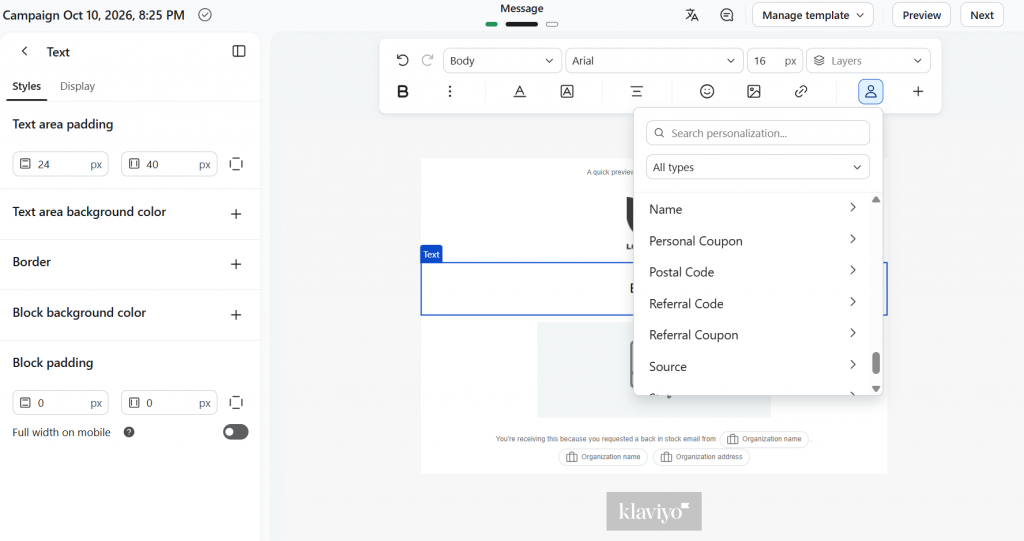
- You can dynamically insert each partner’s unique referral link and assigned coupon code directly into any Klaviyo template.
- Your affiliate communications match the aesthetic style and polish of your customer newsletters, reinforcing your branding.
Syncing Affiliate Data to Your Klaviyo Profiles
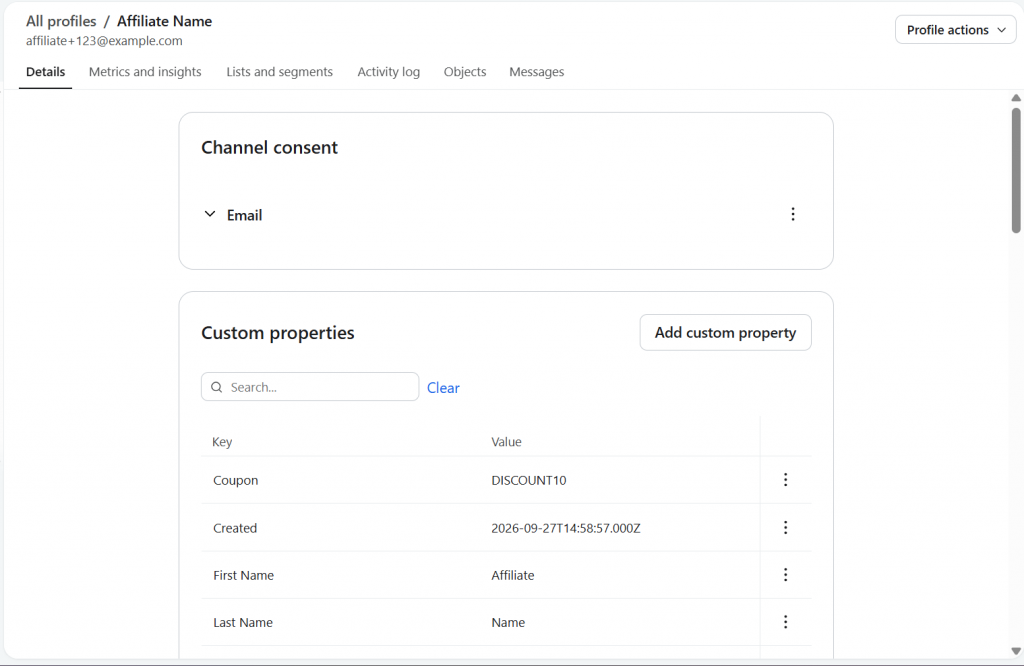
The core engine of the GoAffPro Klaviyo integration is its real-time data synchronization. When a partner signs up in GoAffPro, the app automatically updates or creates their profile in Klaviyo, tagging them with custom properties:
- Affiliate name, first name, and last name
- Email address
- Account status and source
- Referral code and coupon code
- Address, country, state, city, and postal code
- Facebook and Instagram handles
These appear as custom properties on each Klaviyo profile, so you can personalize emails with an affiliate’s own referral or coupon code, or segment by status, country, or source.
Three Ways to Put the GoAffPro-Klaviyo Sync to Work
1. Automate a welcome flow for new affiliates
In Klaviyo, build a flow triggered when someone is added to your affiliate list. A simple four-email sequence works well:
- Day 0: Welcome, how the program works, & their referral link/code.
- Day 2: Where to find banners, asset files, and promotion ideas.
- Day 7: A nudge to share their first link, with one easy tactic to try.
- Day 15: A check-in with support options and a fresh promo idea.
Every new affiliate gets the same strong start, whether you sign up five this week or fifty.
2. Send monthly performance newsletters
A monthly email is one of the best retention tools in an affiliate program. Send it to your approved affiliates and fill each one with insights from your GoAffPro program: top-performing products, upcoming promotions, commission or payout updates, and a spotlight on a standout affiliate.
3. Run segmented campaigns
Use the synced fields to tailor your messages: region-specific promotions by country, separate communication for different affiliate statuses, or targeted outreach by signup source. Keep your affiliate list separate from your customer lists so promotional emails never cross over.
Step-by-Step: Connecting GoAffPro to Klaviyo
Setting up the GoAffPro Klaviyo integration requires no coding and connects in just a few clicks.
Create A Klaviyo List:
- Log in to your Klaviyo dashboard.
- Go to the Lists and Segments section.
- Click on Create List/Segment > Select the List option
- Set a name for the list > click on Create List.
Generate the API Key:
- Open the profile menu > click on Settings.
- Go to the API keys section.
- Click on Create Private API Key.
- Name the key “GoAffPro Integration“ > grant it full access for every API scope > click on Create.
- Copy the generated Private API Key.
Enable Klaviyo in GoAffPro:
- Open your GoAffPro Admin Panel.
- Navigate to Settings > Integrations.
- Go to the Klaviyo integration and click Enable / Setup.
- Paste the private API key there.
- Select the Klaviyo list you created > click Save and Sync.
GoAffPro will run the sync immediately. Open Klaviyo and verify that your affiliate profiles have been synced in the Klaviyo list, displaying custom properties in their profiles.
To use and add those custom profile properties, use personalization option in your Klaviyo template editor:
Conclusion
A partner program cannot thrive on tracking links alone. By connecting GoAffPro with Klaviyo, you replace manual administrative outreach with automated, beautifully branded marketing. Your affiliates stay informed, motivated, and engaged, while your team saves hours of manual follow-up every week. Connect GoAffPro to Klaviyo, set up your onboarding flow, and watch your partner activation rates climb.
FAQ
Yes. GoAffPro has a native Klaviyo integration that syncs your affiliate data to a Klaviyo list. It also synces attributes to Klaviyo, like the affiliate’s unique referral code (for link), coupon code, name, address and more, which you can use as dynamic variables inside any Klaviyo template.
Currently, GoAffPro syncs the following data points to the Klaviyo list, for the affiliate profile: Name, email, status, source, referral code, coupon code, address details, and Facebook and Instagram information.
The integration is built directly into GoAffPro and does not incur additional fees from GoAffPro. You would require the premium plan to access and set up this integration. Additionally, you will simply need an active Klaviyo account capable of sending emails to your contact list size.
Yes. The affiliate data is designed to sync automatically, ensuring that your information is always up to date without any extra effort. You can also trigger a manual sync any time using Re-Sync under Settings > Integrations.
Leave a Reply